 SIM OffersBD
 Finding the right data plan can be confusing with so many options available. Whether you are a heavy streamer or a casual browser, Grameenphone has a pack for you. In this guide, we break down the latest GP internet offer list to help you stay connected without overspending.
We have analyzed the official charts to bring you the best value, complete with the GP internet offer code you need to activate them instantly.
1. Monthly & Heavy Usage Packs
If you want to buy data once and forget about it for the whole month, these are your best options. Many of these work as a GP internet recharge offer, meaning you can simply recharge the exact amount to activate the pack automatically.
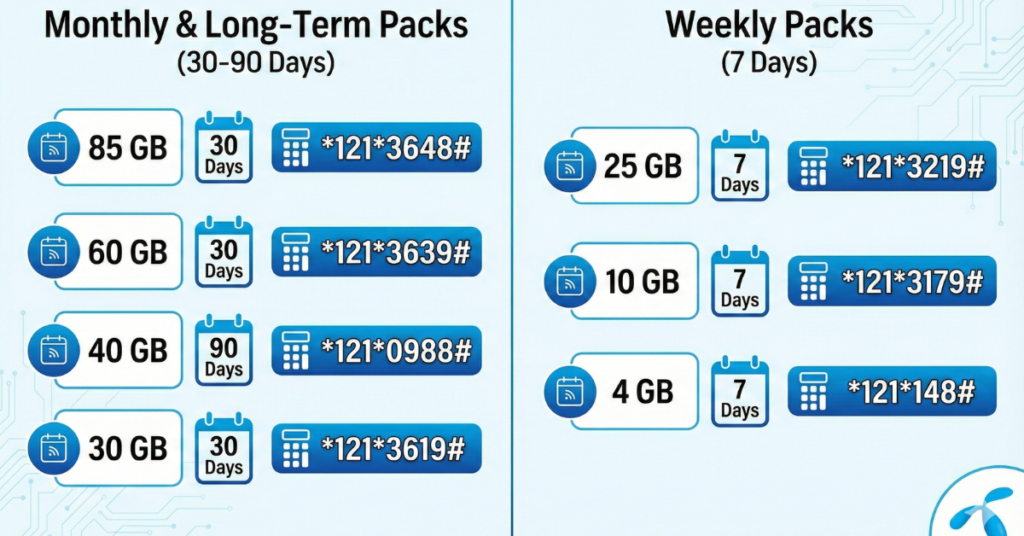
| Data Volume | Price | Validity | Activation Method / Code |
| 85 GB | 798 Tk | 30 Days | Recharge 798 Tk or dial *121*3648# |
| 60 GB | 698 Tk | 30 Days | Recharge 698 Tk or dial *121*3639# |
| 40 GB | 988 Tk | 90 Days | Recharge 988 Tk or dial *121*3649# |
| 30 GB | 599 Tk | 30 Days | Recharge 599 Tk or dial *121*3619# |
Pro Tip: For the 40GB pack, note that the validity is 90 days (3 months), which is why the price is higher than the 60GB pack.
2. GP Internet Offer 7 Day (Weekly Packs)
Need a quick data boost for a trip or a busy week? The GP internet offer 7 day segment provides excellent value for short-term users.
| Data Volume | Price | Validity | GP Internet Offer Code |
| 25 GB | 219 Tk | 7 Days | Dial *121*3219# |
| 10 GB | 179 Tk | 7 Days | Dial *121*3179# |
| 4 GB | 148 Tk | 7 Days | Dial *121*3148# |
3. How to Check Your Data Balance
Once you have purchased a pack, it is important to track your usage so you don’t run out unexpectedly.
- USSD Method: Simply dial the GP internet offer check code:
*121*1*4# - App Method: Download the MyGP App to see your real-time balance and usage history.
4. Frequently Asked Questions (FAQs)
Here are the answers to the most common questions about GP internet offers.
Q1: Does unused data carry forward?
Yes. If you purchase the same internet pack again before your current validity expires, your unused data volume will be added to the new pack, and the validity will be extended.
Q2: How do I stop the auto-renewal of a data pack?
If you don’t want your pack to renew automatically, you can turn it off easily.
- Dial:
*121*3043# - SMS: Type “OFF” and send to 25000
Q3: What is the code for GP Emergency Internet?
Running low on balance and data? You can take an emergency loan.
- Dial:
*1010#or*121*1*3#to avail emergency balance/internet. - Note: The amount will be deducted from your next recharge.
Q4: How do I get the internet settings?
If your mobile data isn’t working, you might need to configure the APN settings manually.
- Go to: Settings > Mobile Networks > Access Point Names (APN) > Add New.
- Name:
GP - APN:
gpinternet - Save and select this profile.
Q5: Can I share my GP internet with others?
Grameenphone does not have a direct USSD code to “transfer” MBs from your balance to another. However, you can:
- Gift a Pack: Use the MyGP App to buy a pack for someone else (using the “Gift” option).
- Transfer Balance: Dial
*121*1500#to transfer talktime balance so they can buy their own pack.
Summary: Which Pack Should You Choose?
- For Value Seekers: The 85 GB pack at 798 Tk is the best long-term deal.
- For Short-Term Users: The 25 GB pack at 219 Tk is the undisputed king of the GP internet offer 7 day category.
- For Ease of Use: Remember that for most big packs, you don’t even need a code—just use the GP internet recharge offer mechanism by loading the exact amount to your number.
 SIM OffersBD